Opening the AI Workout Builder
Click AI Generate on the Workouts tab. Your remaining credit balance is shown at the top right of the window; each generation uses one credit.
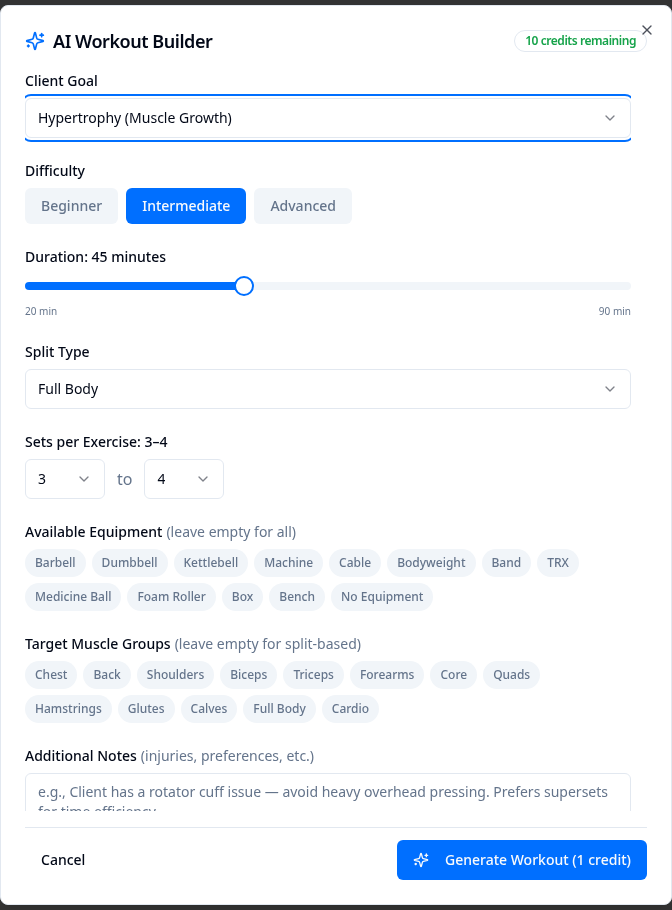
Setting your guardrails
| Setting | Options | Notes |
|---|---|---|
| Client Goal | Hypertrophy, Strength, Fat Loss / Conditioning and more | Drives the rep ranges and exercise selection. |
| Difficulty | Beginner, Intermediate, Advanced | Sets exercise complexity and volume. |
| Duration | 20 to 90 minutes in 5-minute steps | The session is built to fit the time. |
| Split Type | Full Body, Upper / Lower, Push, Pull, Legs | Used when no muscle groups are selected. |
| Sets per Exercise | A minimum and a maximum | Default 3 to 4. |
| Available Equipment | Any combination of equipment chips | Leave empty to allow everything. |
| Target Muscle Groups | Any combination of muscle chips | Leave empty to follow the split. |
| Additional Notes | Free text | Injuries, preferences, time constraints. |
| Must Include / Exclude | Pick exercises by name | Guarantees or forbids specific movements. |
Including and excluding specific exercises
- 1Click Must Include or Exclude.
- 2Search the exercise database and tap the exercises you want.
- 3Included exercises appear as grey chips, excluded ones as red chips.
- 4Click Done to return to the settings, or the cross on a chip to remove it.
Generating the draft
- 1Click Generate Workout (1 credit).
- 2The button shows *Generating…* while the session is drafted.
- 3When it finishes, the draft opens directly in the Workout Builder for review.
Rules the AI always follows: it only uses exercises from your BuddyPT exercise database (it never invents movements), it always produces a warm-up, main block and cool-down, it matches rep ranges to the chosen goal, and it respects your equipment, include and exclude choices.
Reviewing and editing an AI draft
An AI draft is a starting point, not a finished plan. It opens in the normal Workout Builder, so every tool in Building a workout manually and Sets, metrics, rest & supersets applies.
- Exercise selection suits the client's injury history and skill level.
- Prescribed reps and times match your intent for the session.
- Rest periods fit the goal — shorter for conditioning, longer for heavy strength work.
- Supersets the AI created are practical in the client's gym.
- The name, description and tags read the way you would write them.
Nothing is saved to your library until you click Save Workout, so you can discard a draft you don't like by clicking Cancel.
Credits
Each generation costs one credit and the counter updates immediately. The counter turns amber at three or fewer credits and a low-credit warning appears. At zero credits the Generate button is disabled — manual creation is always free and unlimited.
Best practices
- Build templates, not one-offs — a well-tagged template library saves hours every week.
- Use tags consistently — pick a small vocabulary (push, pull, legs, hiit, recovery) and stick to it.
- Limit logged metrics — one or two per exercise keeps compliance high.
- Name sessions for the client — *“Upper Body Push – Week 3”* beats *“UBP v3 final”*.
- Start AI drafts narrow — set equipment and notes first; a vague prompt produces a generic session.
- Duplicate to progress — copy last week's session and nudge the loading rather than rebuilding.
Troubleshooting & FAQs
| Question | Answer |
|---|---|
| The Generate button is greyed out. | You have no credits left. Build manually, or top up your credits. |
| Generation failed with an error. | Try again in a moment. If it keeps failing, relax your constraints — very tight equipment plus muscle plus exclude combinations can leave too few movements. |
| The AI ignored an exercise I wanted. | Add it under Must Include rather than mentioning it in the notes. |
| I cannot drag exercises into a section. | Check the section is expanded — click the section header to expand it. |
| I cannot delete the last set. | Every exercise needs at least one set. Remove the exercise instead. |
| My client cannot see the weight column. | Open Configure metrics on that exercise and switch the logged metric on. |
| I lost my changes. | Changes are only stored when you click Save Workout. |
| Can I add my own exercises? | The builder draws on the BuddyPT exercise database; use the Exercises tab of the Library to manage what is available. |