Why tracking matters
Without a structured system, trainers lose leads to missed follow-ups, forgotten conversations and unclear next steps. The Lead Tracking module gives you a single source of truth for every prospect — from first enquiry to signed client.
- Centralised database of every prospect
- Clear view of where each lead sits in the journey
- Scheduled follow-ups so nothing falls through the cracks
- Full communication history on every card
- Better conversion rates and reporting
Pipeline stages
Every lead moves through four stages. Each stage tells you exactly what action to take next.
1. Discovery Call
The first real conversation. Understand the prospect's fitness goals, health background, lifestyle, expectations, budget and availability. Use this call to introduce your programs and start building trust.
2. Follow-Up
The lead is interested but hasn't committed yet. Send reminders, share sample plans or pricing, and answer outstanding questions via phone, WhatsApp, email or in person.
- Keep engagement warm without being pushy
- Log every interaction against the lead card
- Personalise each message — reference their goals
3. Ready to Convert
The lead has confirmed interest — they've asked about pricing, requested a start date or agreed to the plan. Time to finalise the package, collect payment and onboard.
Moving leads across stages
The pipeline board is fully drag-and-drop. Grab any lead card and drop it into the next column to update its stage in real time.
- 1Open Client Pipeline.
- 2Click and hold the lead card you want to move.
- 3Drag it into the target stage column and release.
- 4The card's stage updates immediately and any linked automations (reminders, notifications) fire.
Scheduling a call
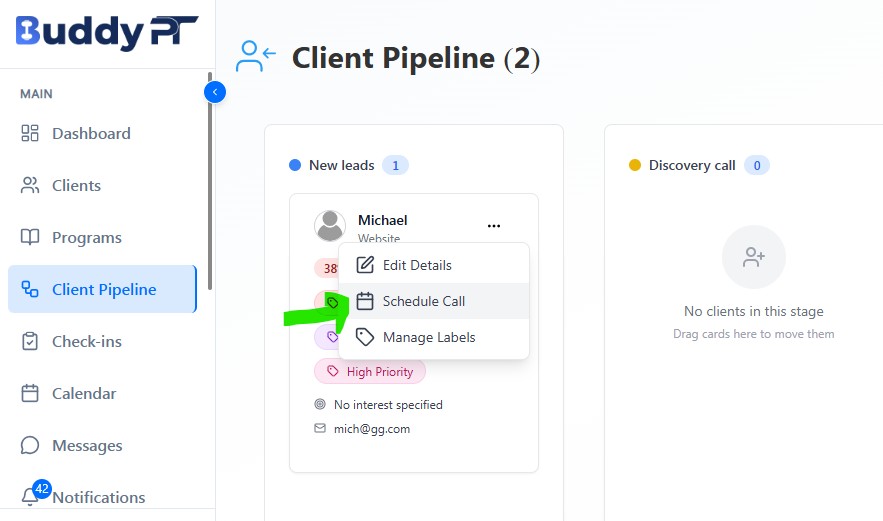
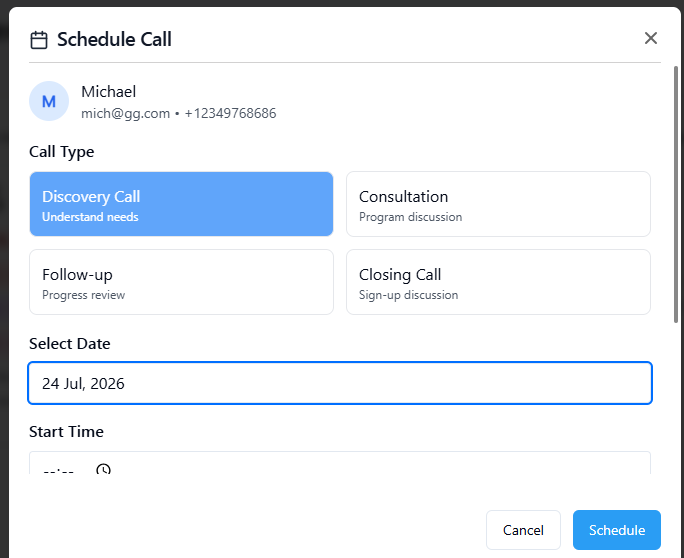
The Schedule Call action lets you book a discovery or follow-up conversation directly from the lead card, with a saved agenda and reminder.
- 1Open the lead card.
- 2Click the three-dot menu (⋮).
- 3Select Schedule Call.
- 4Pick the date, time and add notes or an agenda.
- 5Click Save — the call appears in your schedule and on the lead card.