What the Dashboard is for
The Dashboard is designed to be the first thing you open every morning. In one glance you can see whether any clients are falling behind, who owes payment, whose program still needs to be built, and how today's sessions are tracking. Think of it as your daily command center — everything critical is surfaced here so you don't have to hunt through separate screens.
- Track your account setup progress until you're 100% ready to coach.
- Monitor today's client performance — completions, misses and compliance.
- Jump on clients who need your attention (payments due, no program, low compliance).
- Review the latest client activity — workout feedback, ratings and comments.
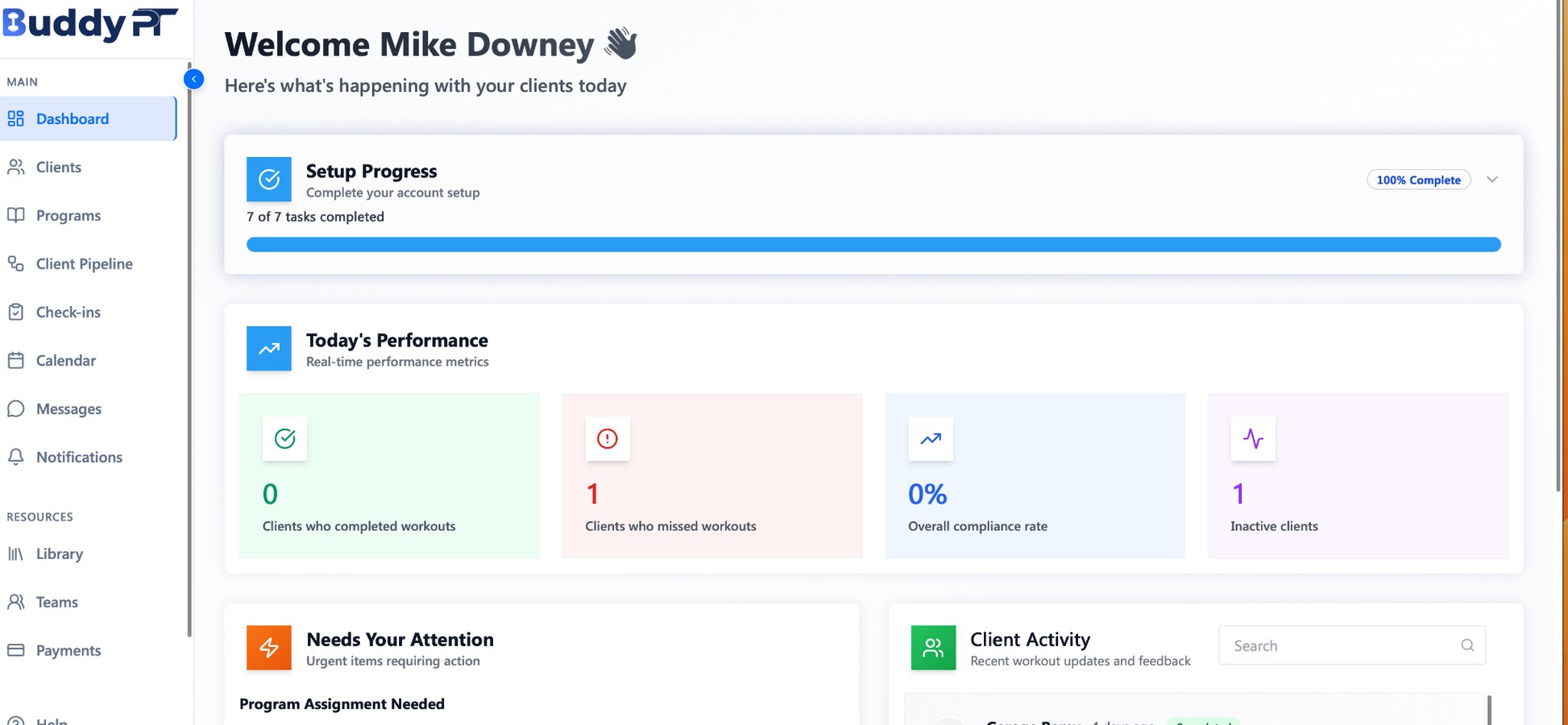
The four Dashboard sections
1. Setup Progress
The Setup Progress section walks you through the onboarding tasks required to run BuddyPT end-to-end — payments configuration, trainer profile setup, client lifecycle setup, email setup (to send from your own address), and branding setup. It shows an overall completion percentage plus the outstanding tasks, and the bar advances automatically as each one is finished until you reach 100%.
2. Today's Performance
A real-time summary of workout activity for the current day: how many clients completed their sessions, how many missed, the overall compliance rate, and how many clients are currently inactive. See the dedicated Today's Performance article for the full breakdown.
3. Needs Your Attention
Client-related tasks that require action from you today — upcoming payments, clients without a program, and low-compliance alerts. Every item has a one-click action so you can resolve it without leaving the Dashboard.
4. Client Activity
The latest workout completions, feedback, ratings and comments submitted by your clients through the Client App. Use the search box to jump straight to a specific person.